
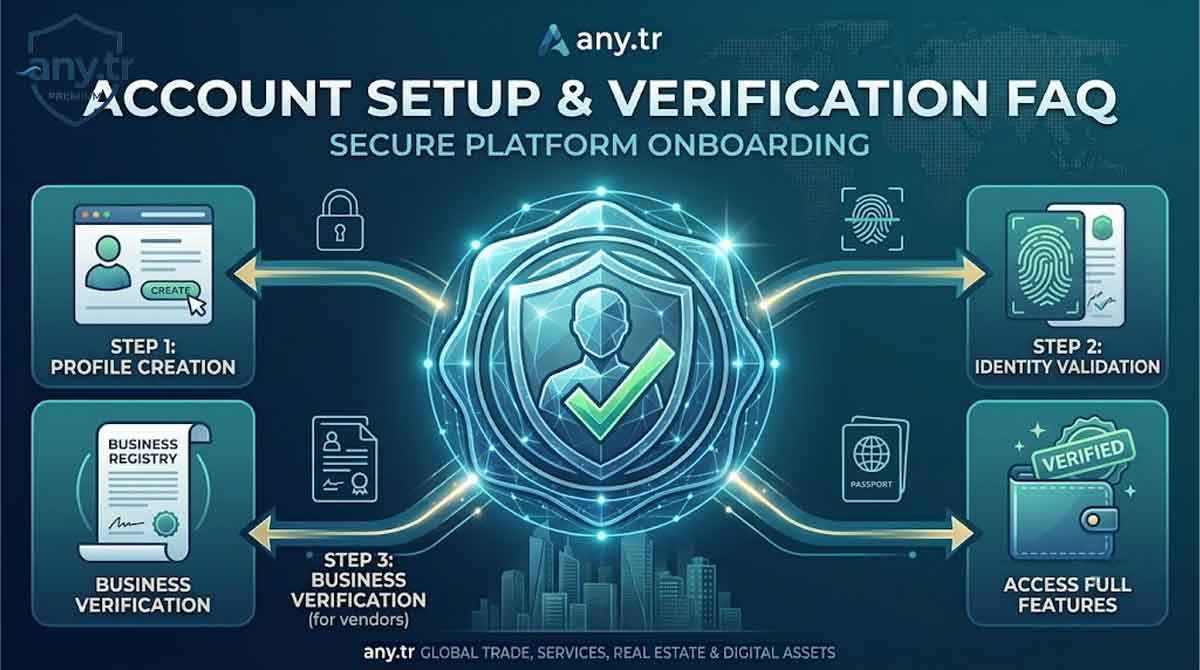
Account Setup & Verification
Establishing a verified user profile on ANY.tr is the foundational step required to participate in our global, multi-vendor marketplace infrastructure. Whether you are onboarding as an international retail buyer, a physical goods vendor, a freelance digital service specialist, or a corporate real estate host, your account serves as the central node for all secure data, transactional histories, and platform communication configurations. Our identity verification protocols are engineered to comply with international financial regulations, anti-fraud frameworks, and marketplace protection standards to ensure absolute trust across all distributed trading networks.
Account Creation Framework
The initialization of your digital presence on the platform requires the submission of precise registration metrics. During the primary signup flow, users are prompted to allocate a primary administrative email address, generate a complex cryptographic password, and select their primary operational intent within the ecosystem. The platform automatically distinguishes between consumer-facing profiles and merchant-oriented storefront nodes, configuring your backend system dashboard dynamically to match your structural workflows.
Maintaining data integrity during this initial phase prevents automated network bans and localized system lockouts. If your registration telemetry indicates duplicate account patterns linked to previously suspended nodes, the system algorithm will instantly flag the profile for manual review by our security compliance branch. All submitted email addresses undergo an immediate validation cycle where a cryptographic token link is dispatched to confirm inbox ownership before any commercial tool access is granted.
Identity Verification Layers
To eliminate cross-border financial risks, synthetic identity generation, and money laundering vectors, ANY.tr enforces a robust multi-tiered verification architecture. The level of information required from a user correlates directly with their operational volume, storefront classification, and geographic trading zones. Buyers executing standard checkouts require baseline verification, whereas vendors handling split-payment disbursements must clear stringent business registration and biometric validation benchmarks.
Individual merchants must provide clear digital scans of government-issued identification media, such as valid international passports or national identification cards, alongside verified proof of physical residence documents like recent utility statements or official banking logs. Corporate entities, enterprise suppliers, and real estate agencies are required to upload localized trade registry certificates, corporate tax registration forms, and authorized signatory mandates. The following data breakdown highlights the documentation requirements applied across our distinct platform user categories:
| User Classification | Mandatory Document Sets | Standard Processing Windows | Operational Access Scope |
|---|---|---|---|
| Standard Global Buyer | Verified Email Address, Mobile Phone Confirmation | Instant automated clearing | Global marketplace browsing, order placement, digital product downloads |
| Individual Freelancer & Vendor | Government Photo ID, Proof of Residence, Personal Tax Number | Twelve to twenty-four hours | Storefront creation, digital service listing, escrow wallet balance withdrawal |
| Corporate Merchant & Agency | Company Registry Certificate, Tax ID, Signatory Authorization Ledger | Twenty-four to forty-eight hours | Bulk inventory loading, high-volume payout structures, api integration tools |
Authentication and Operational Limits
Unverified accounts operate under strict structural constraints to protect our payment networks and independent suppliers from malicious bot interactions and chargeback fraud. Once an individual account clears specific verification thresholds, these operational ceilings are automatically adjusted by our account management engine. System limitations restrict both the total monthly financial transaction volumes and the absolute frequency of listing deployments available to the profile.
Failure to provide verification materials within the designated grace periods will result in temporary dashboard restrictions. Restricted accounts can browse the public directory loops but are barred from executing checkouts or accepting new customer briefs. The matrix below outlines the exact relationship between your verification completion status and your active platform capabilities:
| Verification Completion Level | Monthly Transaction Ceiling | Escrow Clearance Speeds | Listing Volume Capacity |
|---|---|---|---|
| Tier One: Baseline Email Verified | Five Hundred Dollars Maximum | Standard standard system holds | Zero active storefront listings allowed |
| Tier Two: Identity Confirmed | Ten Thousand Dollars Maximum | Standard review cycle releases | Fifty active listings across categories |
| Tier Three: Corporate Business Verified | Unlimited Financial Capacity | Accelerated processing channels | Unlimited active multi-vendor listings |
Security Integration and Account Protection
Beyond initial identity confirmation, users are required to maintain active backend security configurations to shield their transactional data and accumulated escrow balances from unauthorized access. The platform mandates the deployment of multi-factor authentication systems across all vendor profiles and corporate administrator dashboards. This secondary security layer involves linking an independent authenticator application or hardware token key to your master account credentials.
If our system monitors suspicious access coordinates, such as sudden geographical IP hops or anomalous hardware browser signatures during sensitive actions like payout account modifications, the security core will trigger an immediate emergency lock. Resolving an emergency lock requires the submission of a localized facial biometric verification selfie alongside a handwritten date declaration badge, matching the original identity files archived during the primary onboarding pipeline.
Troubleshooting Verification Delays
While our automated verification engine processes the majority of global registration files efficiently, certain exceptions can lead to manual administrative queues and extended processing windows. The most frequent causes for document rejection include low-resolution image file uploads, expired passport media, cropped corners on identification certificates, or textual mismatches between your official corporate registration paperwork and the billing text typed into your marketplace profile dashboard.
If your verification package is officially rejected by our compliance agents, a comprehensive systemic diagnostic report will be published directly inside your vendor notification tab. You can rectify the issues by obtaining high-definition scans under natural lighting environments and resubmitting the updated assets through the secure verification portal. Do not open multiple support tickets regarding the same registration file, as duplicate entries recycle your verification queue ranking back to the initial baseline initialization point.
anytr, marketplace onboarding, account verification, vendor registration, identity verification, escrow security, multi vendor platform, business verification, user setup, kyc compliance






I was skeptical about the verification process at first, but it was incredibly straightforward. The step-by-step guide made it easy to upload the required documents, and my vendor account was approved much faster than I expected. Great to see a platform that takes security and trust seriously!
Setting up our corporate profile was seamless. The verification instructions in this article are crystal clear, preventing any back-and-forth errors. Within a few hours, our account status was fully verified and we were ready to list our services. Excellent onboarding experience.